Design and Layout: Clean, Modern, but Generic by Default
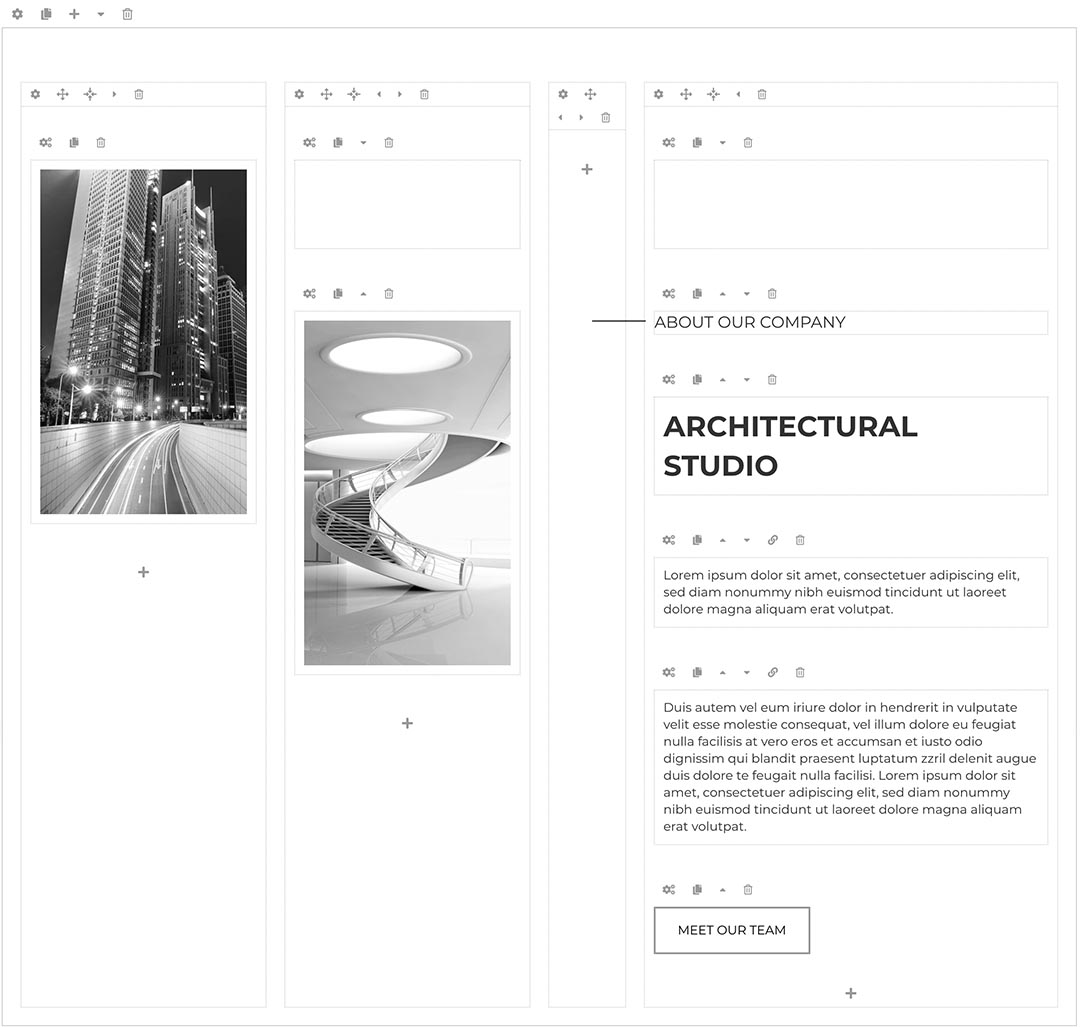
Template Architecture targets architects, studios, and construction professionals. The default look is minimalist: large hero images, clear typography, and a neutral color palette. This suits portfolios and project showcases where visuals must dominate without UI clutter.
The template comes with predefined module positions for header, hero, services, projects, testimonials, blog, and contact. This enables quick page assembly without structural coding. The grid is responsive and uses a predictable column system that behaves well across desktops, tablets, and phones.
Weak point: the visual style is intentionally restrained. Out of the box, it can feel too generic if your studio brand is bold or distinctive. You will likely invest time adjusting colors, typography, and imagery. The template supports this, but it is not “install and forget” if you need a very strong brand identity.
Technical Foundation and Performance
Template Architecture is built on the HotJoomlaTemplates framework, optimized for current Joomla releases and modern PHP versions. The codebase focuses on clean HTML output, minimal inline styling, and compatibility with server‑level caching.
Performance is generally strong. The template supports:
- Responsive images and a flexible grid
- Lightweight CSS and JS that can be compressed via Joomla or third‑party plugins
- Compatibility with popular caching and optimization extensions
On a properly configured hosting stack (PHP 8.x, HTTP/2, opcode cache), the template loads quickly even with large image galleries. The main performance risk arises from user‑added heavy images and scripts, not from the template itself.
However, because the design leans on the Hot framework, advanced developers might find it less transparent than a barebones, framework‑free template. Deep customization sometimes requires understanding the framework’s parameters, overrides, and update behavior, adding a slight learning curve.
Customization and Flexibility
The template exposes a broad set of parameters in the Joomla Template Manager. You can adjust color schemes, logo, fonts (often via Google Fonts), layout widths, and some animation effects without touching code. Multiple predefined “styles” or presets allow quick re‑skinning for different architecture or design niches: residential, commercial, interior, or engineering.
More advanced customization uses:
- Template overrides for Joomla components and modules
- Custom CSS blocks in the template options
- Additional module positions for unique landing sections
For a typical architecture firm, this is sufficient to build a unique site while still staying within a familiar Joomla workflow. The weak point appears when you aim for highly unconventional layouts or heavy interaction (complex animations, custom JavaScript widgets). The template does not constrain you, but it also does not provide specialized support or builder‑style tooling for those advanced UI patterns.
Content Structure and Built‑in Features
Template Architecture is structured around common use cases in the AEC (Architecture, Engineering, Construction) domain. You typically get pre‑configured layouts for:
- Home with hero image or slider, key services, and featured projects
- Projects or portfolio with filtered listings
- About with team and firm history
- Services with clear summaries of offerings
- Blog or news to publish updates and thought leadership
- Contact with map and form integration
These are implemented using standard Joomla articles, modules, and menu structures, which simplifies long‑term maintenance. No proprietary content builder is required, reducing lock‑in risks. The template usually includes sample data to bootstrap the site quickly.
A weak spot is that specialized architecture features—such as advanced project metadata, BIM integration, or complex filtering by building type, size, or location—are not native. You must rely on third‑party extensions or custom fields to reach that level of domain specificity.
Compatibility and Integration
The template is updated for current stable Joomla versions and follows Joomla’s MVC structure. It plays well with typical extensions architects use: gallery plugins, form builders, SEO suites, and multilingual components.
Module positions and layout are documented, which eases integration with:
- Contact forms (e.g., RSForm, ChronoForms)
- Gallery sliders and lightbox plugins
- Caching and optimization tools
- SEO and analytics extensions
As with any commercial template, you should test major extensions in a staging environment. Highly opinionated third‑party builders or page composers may overlap with the template’s layout logic and require additional tweaking.
Documentation, Support, and Maintenance
HotJoomlaTemplates provides documentation that covers installation, sample data import, and configuration of the principal template options. For intermediate Joomla users, this is adequate. Newcomers can follow step‑by‑step instructions to replicate the demo.
Support is delivered via the vendor’s ticket or forum system, with updates available through your membership or license period. Updates typically track Joomla core changes and address compatibility and security issues. This ongoing maintenance is a strong argument for choosing a commercial template over abandoned free alternatives.
The main weakness in this area is that documentation focuses on standard setups. If you attempt heavy customization or integration with uncommon extensions, guidance becomes sparse and you will rely more on general Joomla knowledge than on template‑specific resources.
Conclusion: A Solid, Professional Base for Architecture Sites
Template Architecture is a well‑engineered Joomla template for architecture and construction firms that want a modern, responsive, and maintainable site without investing in a fully bespoke theme. It performs well, integrates cleanly with the Joomla ecosystem, and offers sufficient configurability for most professional practices.
Its weak points—generic default styling, dependency on the Hot framework for deep customization, and lack of ultra‑specialized domain features—are real but manageable. With thoughtful branding, careful image optimization, and selective use of extensions, Template Architecture becomes a robust, future‑proof foundation for showcasing projects and attracting new clients.