WP Latest Posts, the WordPress recent news plugin
WP Latest Posts plugin, display your latest WordPress news anywhere including in page builders and in Gutenberg. The plugin includes several responsive themes
Why WP Latest Posts, the WordPress recent news plugin
- Automatically formats posts, pages, and custom post types into news blocks.
- Includes 8 built-in responsive themes for displaying latest content.
- Each news block is independently configurable with its own settings.
- Flexible content source selection (posts, pages, categories, tags, custom post types).
- Advanced filtering options to control which content appears in each block.
- Easy theme selection per block: pick a theme and you're done.
- Designed as an advanced WordPress news plugin for automated content display.

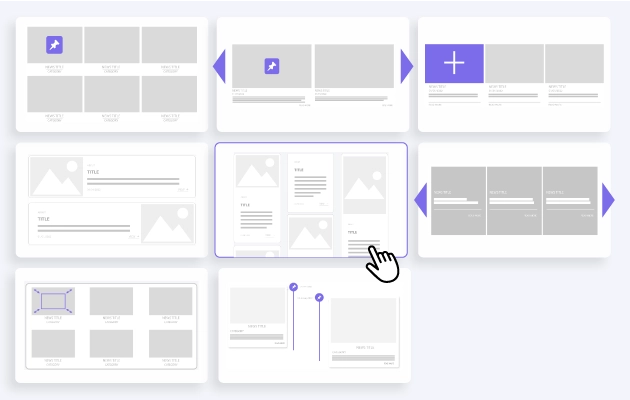
Give some style to your WordPress recent posts and news WP Latest Posts includes 8 inbuilt themes, and there's not just themes, they really change the way your news content are displayed. The themes are responsive, and each theme has a dedicated configuration, so you just need to focus on your content and let our WordPress news plugin do the rest. You can define colors to make the latest news fit your theme's design in just one click. Themes list: Default news theme: blank layout, highly configurable Smooth hover: news with slider layout Masonry news wall with category grid: a masonry compact wall Masonry wall with 2 layouts, horizontal and vertical news display Portfolio: image-based presentation Timeline: content displayed based on dates (chronologically) WP LATEST POSTS THEME DEMO
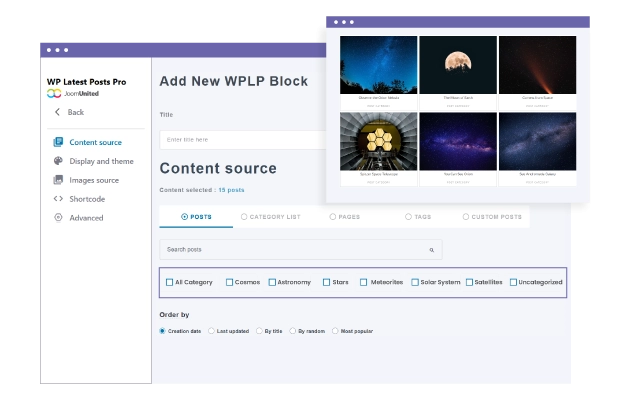
A flexible WordPress news plugin WP Latest Posts compiles your news in a very flexible way. You have the possibility to select as a source one or several post categories, pages, and custom post types in different display blocks. And each block can be placed where you want it in your content. Numerous content filters are available including: Filter by content type: posts, categories list, page, tag, custom post type Filter content published before/after a date Order news posts by date, title, random Display articles from the last number of years, months, days or hours Optionally select ACF fields & groups of fields
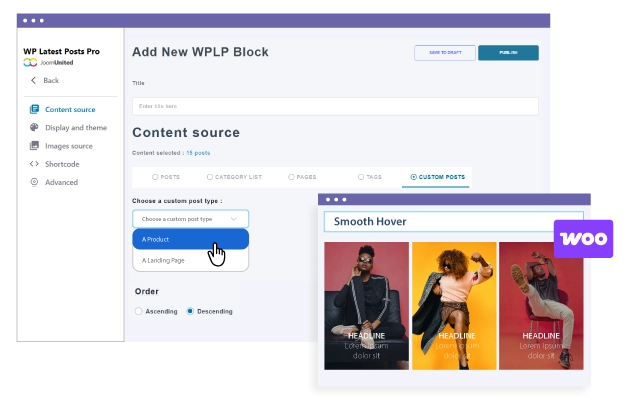
WordPress custom post types and WooCommerce integration Make a stunning design for your WooCommerce product listing with 8 themes and tons of products filtering options and display settings. The WP Latest Posts plugin is also integrated with all the major page builders and their WooCommerce layouts. WOOCOMMERCE DEMO WOOCOMMERCE DETAILS
Load your WordPress recent custom posts with style Additionally to the WooCommerce integration, you can load any custom posts types as source. Any plugin that uses custom posts like a calendar, a file manager or anything else can be used as news source. CUSTOM POSTS DEMO CUSTOM POSTS DETAILS


Multiple and unlimited latest news blocks Setup multiple news element item with a different configuration for each one. Then you can display each news block in various pages and multiple instances on the same page. The process is quite simple, create news blocks, insert them into your editor or as a widget, and you’re done!
WordPress breaking news! It's easy to setup The WordPress news plugin configuration interface has been designed to be fast to setup and edit. Select the news source, choose a design, place the news block where you want it to appear, and you're done! Do you need to modify the number of news item loaded, or a theme? It's one click away.


Latest posts in the WordPress editor or in any page builder All the WP Latest Posts features are available in the WordPress Gutenberg editor through a dedicated block, but also in Elementor and DIVI Builder and you load them using a widget. In each news block, we also generate a shortcode and a PHP snippet to include in your custom layouts. So WP Latest Posts is compatible with all the major page builders and with custom themes.
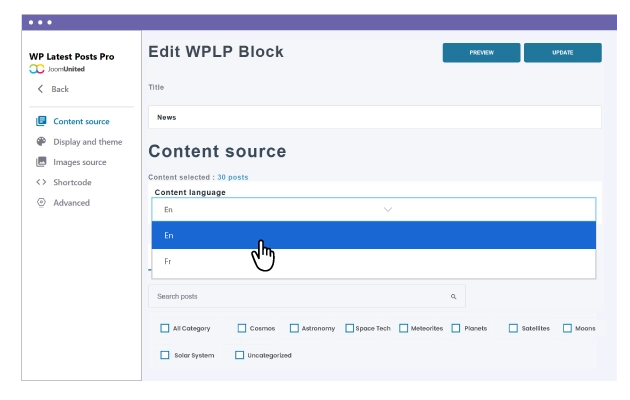
Ready for WordPress Multisite and multilingual websites WP Latest Posts has a dedicated WordPress Multisite and Multilingual integration. Once the multisite network is activated, you'll be able to get any content from any website of your network and then use all the latest posts power to display your content the way you want. About multilingual news, once WPML or Polylang plugin are detected you'll be able to filter your news content by language.
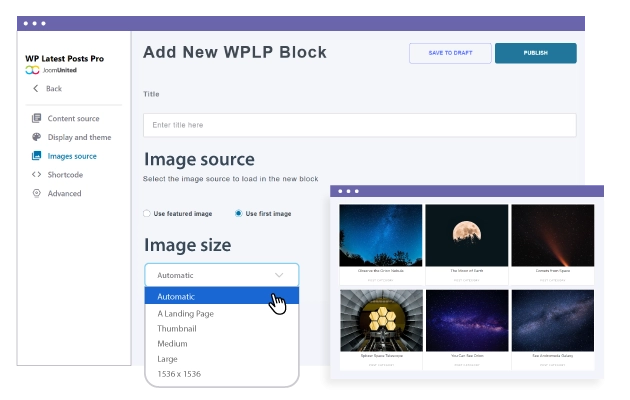
Position images accurately and optimize the loading time When using a news plugin, there are chances that you have catchy images. With WP Latest Post plugin you have the control on news images. You can define the image ratio, force image crop and resizing. Of course everything can be controlled also regarding the news image spacing.
Detailed Features
Responsive Layout
Seamless experience on desktop, tablet, and mobile
Clean Typography
System fonts optimized for readability
Flexible Grid
Modern and adaptable layout system
Customizable Colors
Fully editable color palette
Balanced Spacing
Optimal use of white space
Simple Header/Footer
EEssential and no-frills elements
WooCommerce Compatible
Integrated e-commerce with a consistent design
Easy Menu
Clean and intuitive navigation
Contact Form
Essential contact form
Portfolio Grid
Minimalist project gallery
Clean Blog
Content-focused blog layout
Widget Areas
Essential and organized widget areas
Lightweight Code
Minimal CSS and JS for maximum speed
Optimized Images
Intelligent resource loading
Cache Friendly
Compatible with all cache plugins
Optimized Database
Efficient queries and a clean database
CDN Ready
Ready for Content Delivery Networks
Standards Compliant
Valid and optimized W3C code
Clear Documentation
Easy-to-follow step-by-step guides
Email Support
Email assistance with quick responses
Regular Updates
Constant maintenance and improvements
Demo Data
Sample content to get started immediately
Child Theme
Child theme for safe customizations
FAQ
Answers to the most common questions