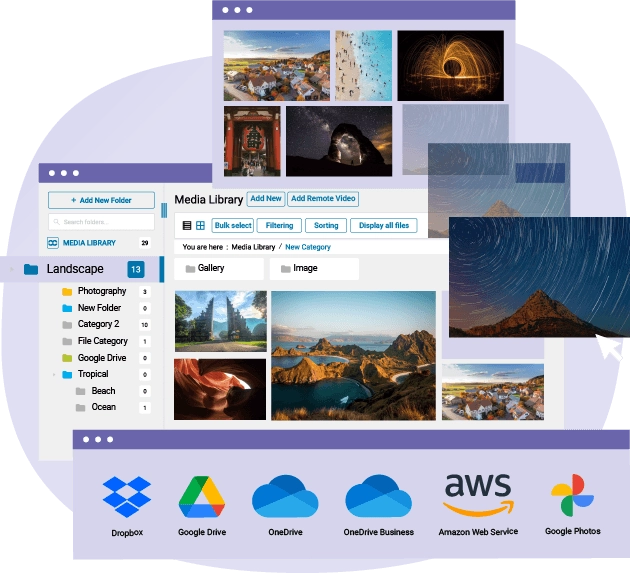
WP Media Folder, go further than anyone with the WordPress media library
WP Media Folder plugin, your WordPress media library with folders. Advanced media searching and filtering, watermarks, image replacement...
Why WP Media Folder, go further than anyone with the WordPress media library
- Designed for all user levels, from beginners to advanced WordPress users
- Simplifies media management by organizing files directly inside the native WordPress media library
- Provides folder-based navigation so you can browse media like a desktop file manager
- Offers drag-and-drop organization for moving and classifying media items quickly
- Includes hundreds of enhancement features to supercharge the default WordPress media library
- Improves productivity and clarity when handling large numbers of media files in WordPress
You asked for it, we did it. WP Media Folder, go further than anyone with the WordPress media library From beginners to advanced users, WP Media Folder is the easiest way to manage media on WordPress. Supercharge your WordPress media library with hundreds of features. Unlimited folders and sub-folders Advanced media searching and filtering Replace a media in all WordPress posts Automatic watermarks on a folder selection Synchronize server files with folders Google Drive, One Drive, Dropbox, Amazon S3 DigitalOcean, Linode, Wasabi full integration photographer addon, present your photo like a pro And many more media folder features... No auto-renewal. Renew only if you want Buy now! Features Comparison
PRICES Plugin prices start from $49, all included, unlimited websites SEE PRICES
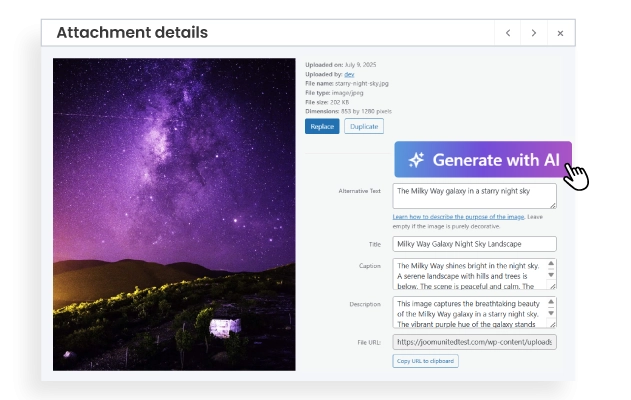
One-Click AI Metadata Generation With a single click, WP Media Folder uses AI to create titles, alt text, and descriptions for your images. No more manual input! Just smarter, SEO-ready content. ✅ Title (image name) ✅ Alt text (for accessibility & SEO) ✅ Description (for improved context) MORE DETAILS ON IMAGE AI
WordPress media access control by user or user role Restrict access to your WordPress media using the WP Media Folder display control. WP Media Folder has a tool to limit media access and media management to a single user or WP user role (share access to all media that belongs to a user role). This is quite useful when you got several content editors on your website. MORE ABOUT MEDIA ACCESS CONTROL

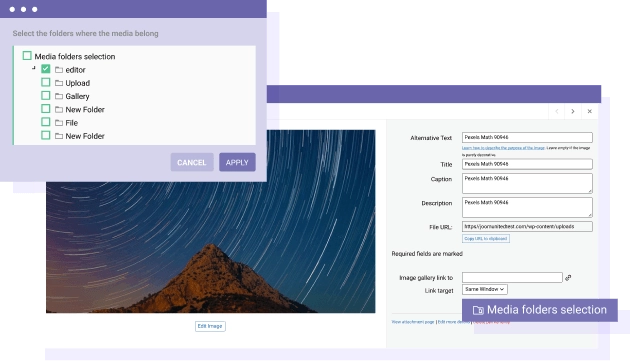
Media in multiple media folders You can place your media in folder and sub-folder, furthermore one media can be in multiple folders and it's only one click away! You can also use the WordPress media manager to batch apply multiple folders on media. Never re-upload the same image, just put it in several folders!
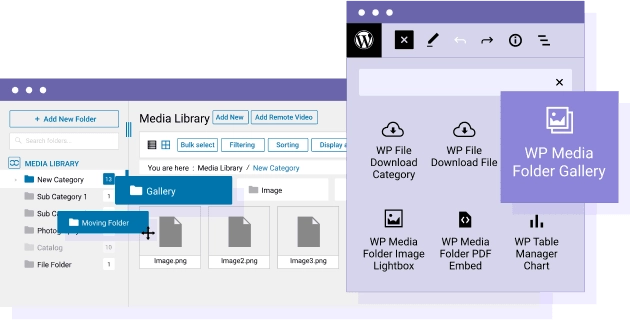
Media Folder for the WordPress Gutenberg Editor WP Media Folder advanced media library includes 9 blocks in WordPress Gutenberg editor. Furthermore, the media folder plugin has 2 dedicated Gutenberg blocks to manage WordPress advanced galleries (WordPress default enhanced galleries and galleries from the plugin Addon). GUTENBERG MEDIA MANAGER DETAILS
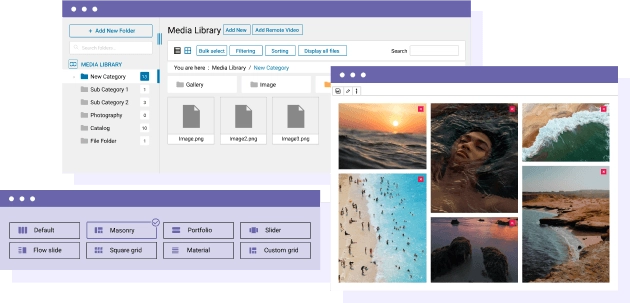
Create WordPress galleries from media folders In addition to the WP Media Folder Gallery addon we've implemented a simple WordPress gallery enhancement. This is features you can apply to WordPress galleries with simple settings like 4 themes (masonry, portfolio, slider and image lightbox), you can also automatically import media folders to WordPress galleries. GALLERY ENHANCEMENT DETAILS
Detailed Features
Responsive Layout
Seamless experience on desktop, tablet, and mobile
Clean Typography
System fonts optimized for readability
Flexible Grid
Modern and adaptable layout system
Customizable Colors
Fully editable color palette
Balanced Spacing
Optimal use of white space
Simple Header/Footer
EEssential and no-frills elements
WooCommerce Compatible
Integrated e-commerce with a consistent design
Easy Menu
Clean and intuitive navigation
Contact Form
Essential contact form
Portfolio Grid
Minimalist project gallery
Clean Blog
Content-focused blog layout
Widget Areas
Essential and organized widget areas
Lightweight Code
Minimal CSS and JS for maximum speed
Optimized Images
Intelligent resource loading
Cache Friendly
Compatible with all cache plugins
Optimized Database
Efficient queries and a clean database
CDN Ready
Ready for Content Delivery Networks
Standards Compliant
Valid and optimized W3C code
Clear Documentation
Easy-to-follow step-by-step guides
Email Support
Email assistance with quick responses
Regular Updates
Constant maintenance and improvements
Demo Data
Sample content to get started immediately
Child Theme
Child theme for safe customizations
FAQ
Answers to the most common questions