WP Table Manager, The WordPress Table Editor Plugin
WP Table Manager is a WordPress responsive table plugin with spreadsheet interface to create price, comparison table or any custom table
Why WP Table Manager, The WordPress Table Editor Plugin
- **Full spreadsheet interface** for managing tables, similar to Excel[3][1]
- **Easy table creation** by selecting a theme and editing immediately[3]
- **HTML cell editing** to add images, shortcodes, or embedded content[3][1]
- **Table copying** with backup and undo features[1]
- **Calculation tools** including SUM, COUNT, MIN, MAX, AVG, and more[1][3]
- **Synchronization** with Excel, Google Sheets, and Office 365, including styles[3][1]
- **Simple end-user editing** by clicking cells, with or without visual text editor[3]
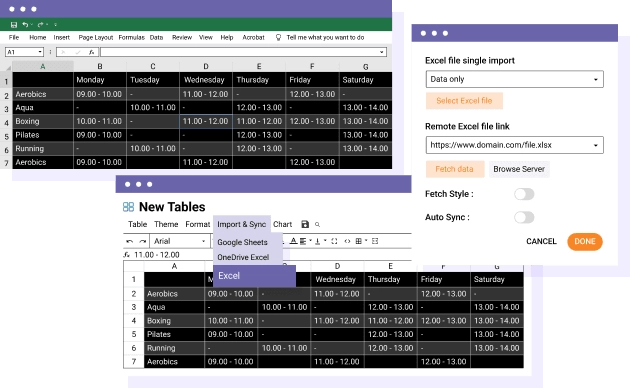
Synchronization with Excel, CSV & online Office 365 Excel documents An Excel and CSV import & export tool is available for each table. Save a lot of time, import your spreadsheet table, create your layout, and publish it. What can I import/Export? You can import all data + some Excel styles or only the table data. The styles compatible with Import/Export are cell background color, font color, font size, borders, Links (HTML format). You can also automatically synchronize Excel files , .CSV files or an Office 365 table with a WordPress table. MORE ABOUT EXCEL SYNCHRONIZATION MORE ABOUT OFFICE 365 SYNCHRONIZATION
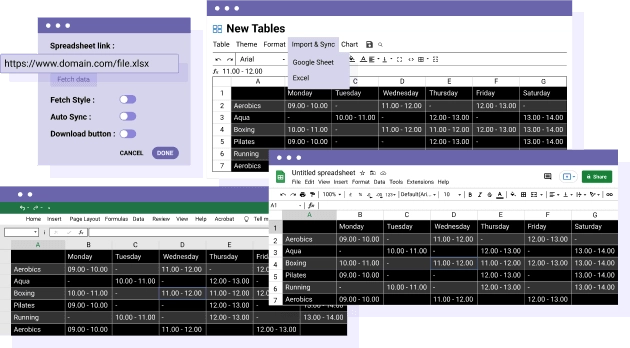
Google Sheets Import/Export and synchronization plugin Yes, you read it right. Select any Google Sheets from Google Drive and you can make an automatic synchronization of the table content. You can import all data + some Google Sheets styles or only the data and preserve your table editor style. A Google Sheets import and export tool is also available for each table. Save a lot of time, import your Google Sheets table, create your layout, and publish it. An export button can also be used for customers from the frontend. MORE ABOUT GOOGLE SHEETS SYNCHRONIZATION
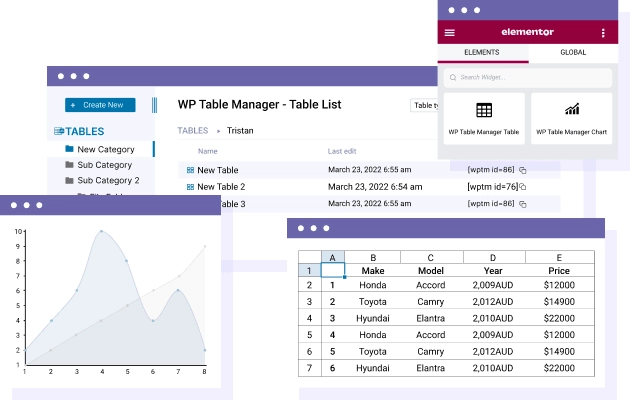
The Elementor table editor plugin WP Table Manager is the only table editor that offers full integration with Elementor page builder. Two dedicated widgets are available: the table content widget that loads any table content and the table chart widget. MORE ABOUT ELEMENTOR TABLE EDITOR
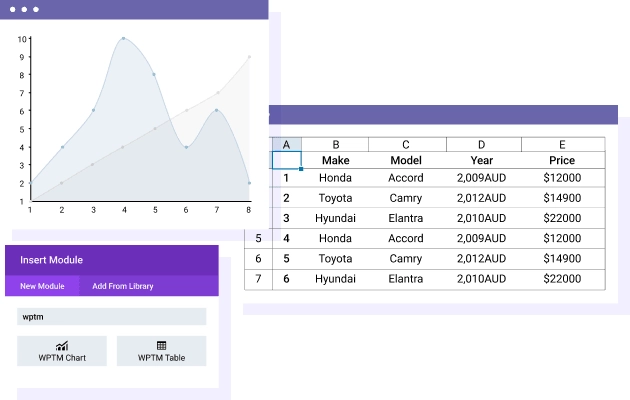
DIVI table editor, DIVI modules included WP Table Manager is the only table editor that offers full integration with DIVI page builder. Load and edit tables with two modules: the table content DIVI module that loads any table in your page, including in the frontend editor and in the same way, the table chart module. MORE ABOUT DIVI TABLE EDITOR

Manage user access to tables data, and front-end table edition From the plugin configuration you can setup WordPress user roles access to tables and tables categories. Furthermore, it's possible to lock cell range edition by user or user role in each table. For each user group, determine: Access to WP Table Manager and its configuration Manage own/global categories Manage own/global tables Lock a cell range edition per WordPress user Lock a cell range edition by user role MORE ABOUT FRONT-END TABLES
Themes and Colors for Tables WP Table Manager comes with 6 themes. Themes have been built from the plugin so it means that everything is editable. For example, add the planning theme, change the hours with your data and you're done. You can even create your own from scratch because tables can be copied in a click. You can also create your own alternate 2 lines colors set and apply it on a selection of table cells. TABLE THEMES DEMO MORE ABOUT TABLE THEME
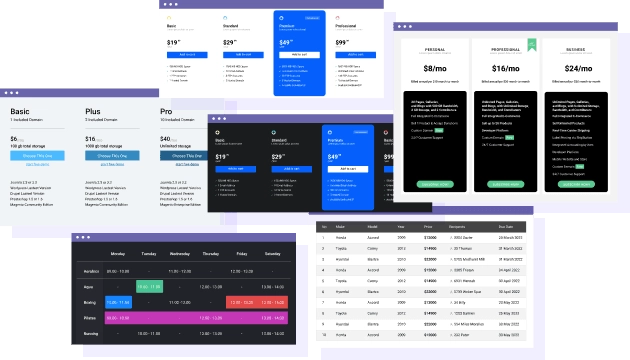

Advanced sort and filter your tables data Filtering and ordering are essential features while displaying a large table on a website frontend. There is no faster way to reach the necessary information by combining these two. Furthermore, it's possible to define by advance an order for the table data on page load and a pagination number. MORE ABOUT SORTING AND FILTERING
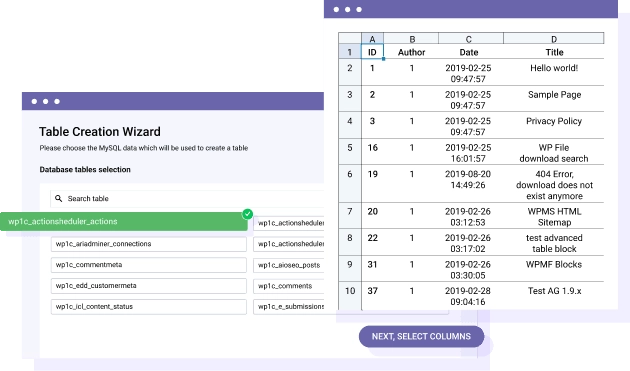
Create WordPress editable tables using database data WP Table Manager got a tool to generate tables from a selection of database data. Select some tables, columns from the database, apply some optional filters then manage table from WP Table manager interface. Your table is incremented automatically on database updates! Furthermore you got some sorting, filters, automatic design, pagination automatically applied. MORE ABOUT TABLE FROM DATABASE
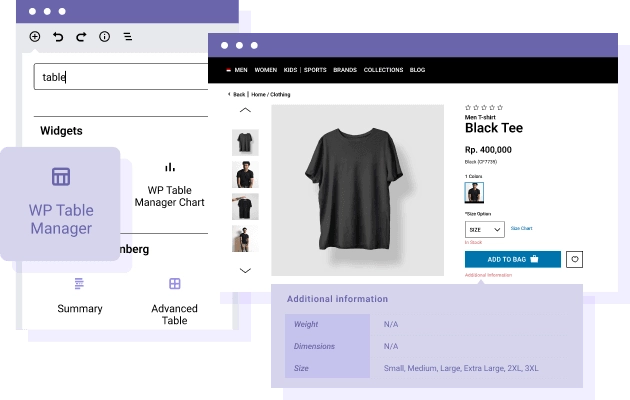
WooCommerce table manager and 3rd party plugins If you’re running a WooCommerce website, using a page builder or the majority of other WordPress plugins in fact - WP Table Manager will work for you! You’ll be able to load your tables anywhere using dedicated integration or shortcode. For example, check integration for Elementor or DIVI page builder.
Generate charts from WordPress table data The WordPress table plugin comes with a chart edition tool. Select a data range, choose one of the 6 type (pie, bar...) and load it anywhere in your content. And just saving the best for last, graphs are automatically updated when you edit your table data! You can also generate multiple charts from a single table. Flexible, right?

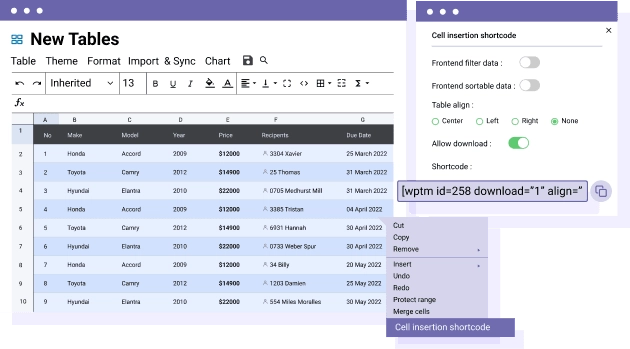
Insert a cell selection in your content You can insert a complete table, a chart in your content but also a custom cell selection! Select a table cell sample by dragging your mouse, and generate a table shortcode to insert the cell selection anywhere. Once the cells are updated in your base table, the cell selection will automatically be updated too.
Detailed Features
Responsive Layout
Seamless experience on desktop, tablet, and mobile
Clean Typography
System fonts optimized for readability
Flexible Grid
Modern and adaptable layout system
Customizable Colors
Fully editable color palette
Balanced Spacing
Optimal use of white space
Simple Header/Footer
EEssential and no-frills elements
WooCommerce Compatible
Integrated e-commerce with a consistent design
Easy Menu
Clean and intuitive navigation
Contact Form
Essential contact form
Portfolio Grid
Minimalist project gallery
Clean Blog
Content-focused blog layout
Widget Areas
Essential and organized widget areas
Lightweight Code
Minimal CSS and JS for maximum speed
Optimized Images
Intelligent resource loading
Cache Friendly
Compatible with all cache plugins
Optimized Database
Efficient queries and a clean database
CDN Ready
Ready for Content Delivery Networks
Standards Compliant
Valid and optimized W3C code
Clear Documentation
Easy-to-follow step-by-step guides
Email Support
Email assistance with quick responses
Regular Updates
Constant maintenance and improvements
Demo Data
Sample content to get started immediately
Child Theme
Child theme for safe customizations
FAQ
Answers to the most common questions